Refresh your AI's memory. Reclaim your disk space.
Wipe out obsolete context, buried caches, and digital residues. Help your AI tools and your OS start fresh and run faster.
npm install -g brain-cleaner ____ ____ _ ___ _ _ | __ )| _ \ / \ |_ _| \ | | | _ \| |_) | / _ \ | || \| | | |_) | _ < / ___ \ | || |\ | |____/|_| \_\/_/ \_\___|_| \_| ____ _ _____ _ _ _ _____ ____ / ___| | | ____| / \ | \ | | ____| _ \ | | | | | _| / _ \ | \| | _| | |_) | | |___| |___| |___ / ___ \| |\ | |___| _ < \____|_____|_____/_/ \_\_| \_|_____|_| \_\
Wipe out obsolete context, buried caches, and digital residues. Help your AI tools and your OS start fresh and run faster.
npm install -g brain-cleaner 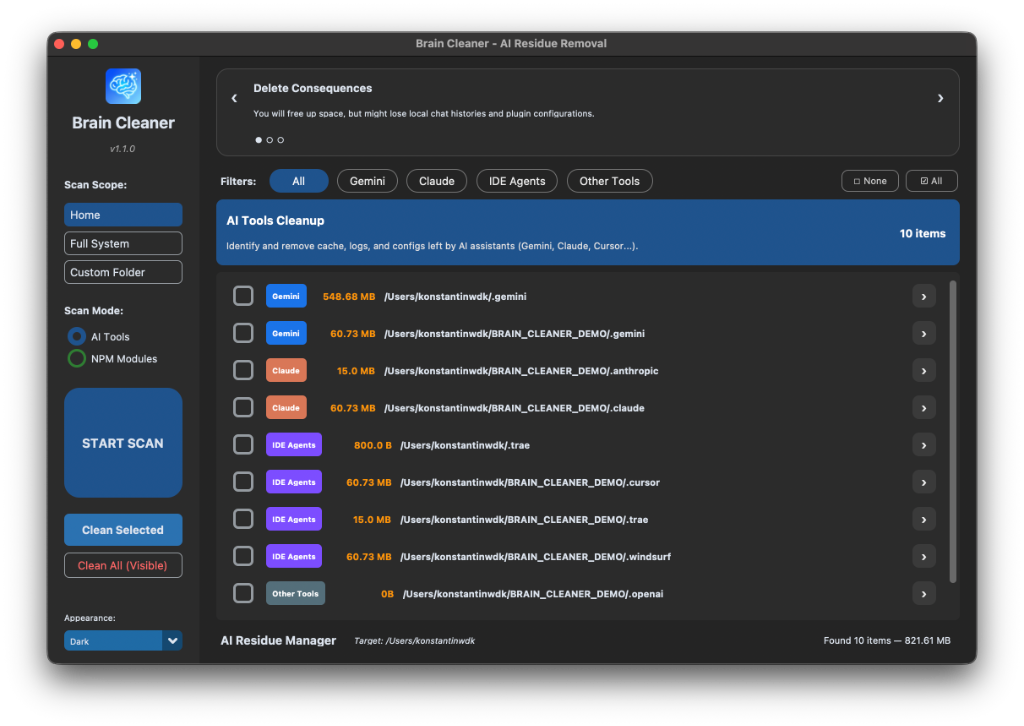
Stop hunting for hidden cache folders. Let Brain Cleaner do the deep work for you.
Detects and removes configuration, cache, and logs from Gemini, Claude, Cursor, Windsurf, and more.
Find heavy node_modules folders effortlessly and reclaim GBs of disk space in seconds.
Choose between a high-performance CLI (TUI) for the terminal or a sleek GUI for visual management.
Runs 100% locally. Your file structure never leaves your machine. No telemetry, no tracking.
Lightning-fast installation. Ready to use in seconds with your favorite tool.
Safe Cleanup: Use this tool to free up space by clearing all AI records and caches. Your project files and core configurations remain untouched.
   ____  ____      _    ___ _   _
  | __ )|  _ \    / \  |_ _| \ | |
  |  _ \| |_) |  / _ \  | ||  \| |
  | |_) |  _ <  / ___ \ | || |\  |
  |____/|_| \_\/_/   \_\___|_| \_|
   ____ _     _____    _    _   _ _____ ____
  / ___| |   | ____|  / \  |  | | ____|  _ \
 | |   | |   |  _|   / _ \ |  \| |  _| | |_) |
 | |___| |___| |___ / ___ \| |\  | |___|  _ <
  \____|_____|_____/_/   \_\_| \_|_____|_| \_\
Welcome to Brain Cleaner CLI v1.2.2
Select Mode to begin:
Initializing Deep Scan...
Scan Complete. Found residues!
Type 'y' to clean or 'r' to reset...
This is a live simulation of the CLI experience.
A deep scan reveals the accumulation of AI session history and heavy node_modules across your entire drive.
Brain Cleaner currently supports residues from Cursor, Windsurf, Claude Desktop, Gemini, and several other popular LLM environments.
Absolutely. The app runs 100% locally. No file paths, structures, or data ever leave your machine.
No. It only targets temporary caches, logs, and obsolete session history. You always have a preview before confirming any deletion.
It periodically checks designated folders for growth in cache and history weight, alerting you when it's time for a refresh.
AI tools like Cursor, Claude Desktop, and Gemini store vast amounts of session history, indexing data, heavy video/screenshot files, and local embeddings. Over time, this can occupy gigabytes of space, slow down your IDE, and lead to cluttered context. Brain Cleaner removes these residues without affecting your active work.
Download the latest version of Brain Cleaner for your operating system.
Universal Binary (Apple Silicon & Intel)
Get .dmg v1.2.2 • 61MBd59750dc9826eb3d66ff9a8b28366cc69eb4f57b553dfe355aef5f8c1e6dc487 64-bit Installer
v1.2.2 • 38MBStandalone Binary
v1.2.2 • 32MBSupporting open-source keeps us going.